HOUSE 13 Controls
Door buttons, interact, light, and the settings the game description actually asks for.
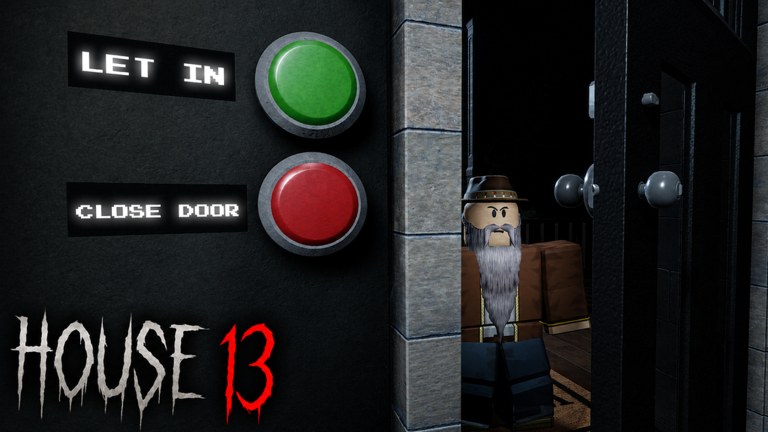
HOUSE 13 controls are simple, and wipes still happen because the door HUD shares a screen with panic. This page is the input and settings guide. It is not a keybind dump for every Roblox default. It is what you must not misclick when a visitor is on the porch. Read how to play for the meaning of Let In and Close Door, then come back here for the hands.
Door HUD
The official panel is two big buttons: green Let In, red Close Door. On PC, click the button, do not click the visitor model and hope. On mobile, the green/red pair is easy to mash with a thumb that was just closing a window. Plant your thumb. If you are the door person in co-op, put the device or mouse only on that plate. Do not also run the camera through a dark stair.
There is no scan key on that plate. Identification is look and listen. See identify Impostors. There is no Codes key on that plate. Codes, if they ever exist, are a different menu — how to redeem.
Move, look, interact
Use standard Roblox move and camera. Interact (click / tap / the platform interact prompt) is how you shut windows, close closets, and toggle lights. Bind interact to something you will not confuse with jump if your client allows it. Jumping during a closet close is how you leave it ajar for The Nester. Sprinting is optional. Sprinting through black volume is how The Hitcher lands. Walk lit paths.
Shift lock can help you face a window while backing out. It can also swing the camera into a wall on stairs. Test it on Easy night one, not on Hard night seventeen. Third person helps you see a sill. First person helps you see a visitor’s face. Swap when the job swaps.
Light as an input
Treat lamps and candles as buttons you own. Turning them off for a screenshot is a control error. Rapid flash against a claimed Nester is a control technique: interact or the light toggle in short pulses. Holding a lamp on is the Hitcher technique. Do not confuse pulse with hold.
Settings the listing asks for
The Roblox description recommends headphones and max graphics. Headphones so you hear knocks and room tone. Max graphics so darkness is readable. If max graphics tanks your frame rate, lower shadows before you lower resolution — you still need to see the door buttons. A 20 FPS plate is better than a pretty 8 FPS plate you cannot click.
Volume: keep game SFX above music. A copied voice is a tell. A soundtrack that buries it is a self-nerf. Mute server music if someone is blasting a boombox in a horror night. Mute is a control.
Mobile-specific pain
The jump button sits near where a Close Door might live depending on UI scale. Lower jump opacity if your client allows, or play door duty on a larger device. Landscape gives you more plate. Portrait is how you Let In with your cheek. If you are serious about Medium’s twelve nights, PC or a tablet is kinder.
What not to bind
Do not overlay an executor GUI on the door plate. How to execute already warns that a misclick green is a wipe. Do not put a giant chat window over Close Door. Do not emote on the porch. Emotes are not a tell that you are human to the game; they are a delay.
Practice the hands on Easy. Six nights is enough to make green/red and interact boring. Then the night loop is the only brain left. HOUSE 13 is released and online. Your controls are shared with 31 other people who will click for you if you let them. Own your button.
Frequently Asked Questions
Quick answers to the most common HOUSE 13 questions.
What button lets someone in?
The green Let In control on the door HUD. Red is Close Door.
How do I shut windows and closets?
Use the normal Roblox interact prompt. Walk the night loop so you actually touch them.
Should I play on max graphics?
As high as you can while the door buttons stay clickable. Darkness readability matters for The Hitcher.
Is there a scan keybind?
No. Identification is visual. See identify Impostors.